
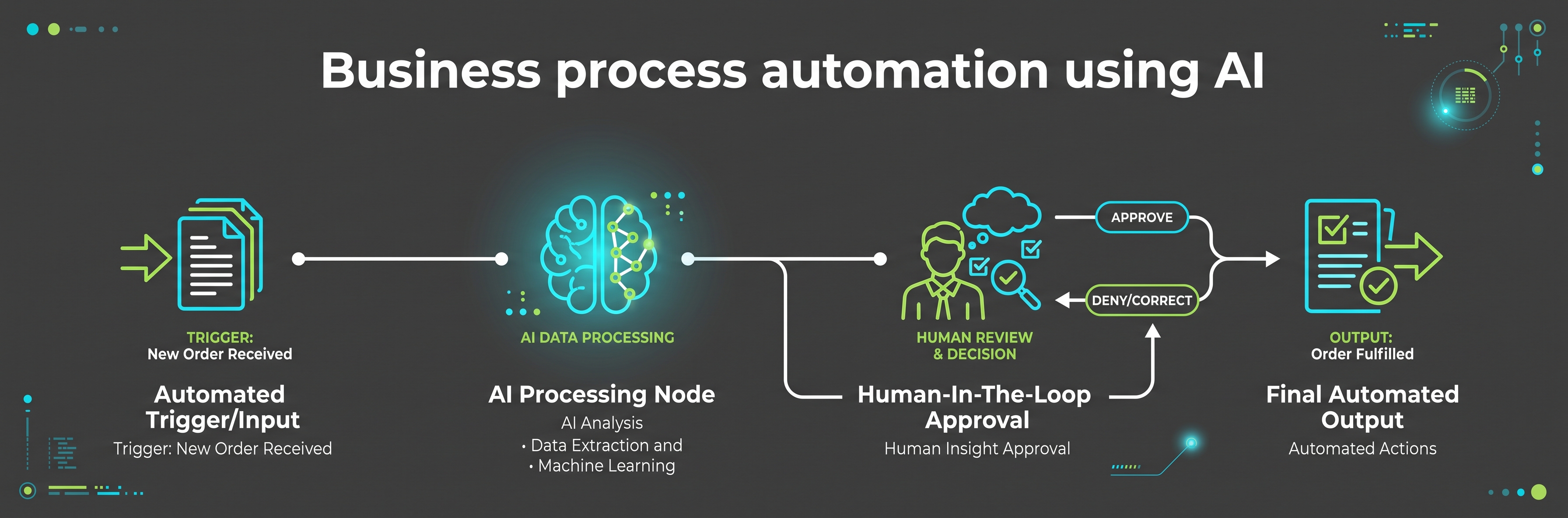
Business process automation using AI works best on one process at a time, with the routine steps handled by fixed rules and the wording handled by a draft you approve.
That gives you something you can test, explain and switch off. It also keeps the parts customers judge you on, the promise and the tone, in your hands.
Quick answer
Pick a process that repeats every week. Write down its trigger, inputs, outputs and finishing point. Give the fixed steps to software, the language steps to an AI tool and the judgement to yourself. Write the exception list and the privacy checks before launch. Test on old cases, then a small live batch. Measure minutes saved against tool cost and review time.
The plan below follows that order. Work through it once and you have a process you trust, plus a template for the next one.
Key takeaways
- Automate one process, not a department.
- Separate fixed rules, AI-assisted drafting and human judgement. Label every step.
- Design the exceptions first. One ambiguous enquiry should always reach a person.
- Record what personal data enters the tool, why, where it goes and for how long.
- Measure minutes per case, response time and exception volume, then subtract tool cost and review time.
Problem, solution and action
Admin work grows quietly. Enquiries get answered late, follow-ups get missed and the same information gets typed three times in three places.
Take one repeating process and define it properly. Fixed rules move the data, AI drafts the language, you approve anything that carries a promise.
Score your candidate processes with the readiness score below, choose the highest, then map its trigger, inputs, outputs and exceptions on one page before you open a single tool.
Choose one process for business process automation using AI
Automation pays when the same steps happen often enough to be worth defining. A process that runs twice a year rarely earns the setup time.
Look for four signals. It repeats weekly. It follows the same steps each time. It has a clear trigger and a clear finish. Being late causes a real cost, such as a lost enquiry or a chased invoice.
Common first candidates in a small business include new enquiry handling and follow-up, quote or proposal preparation, appointment reminders, invoice chasing, onboarding a new client and turning support questions into help content. If you are still deciding what belongs in that list, the wider guide on what automation in business means before business process automation using AI gets involved sets out the difference between a shortcut and a system.
An automation-readiness score before business process automation using AI begins
Tick every statement that is already true of the process you have in mind. Seven or more suggests it is ready. Four to six means fix the gaps first. Three or fewer means choose a different process.
Map the inputs, outputs and triggers
A process map is one page that answers five questions. Written down, it becomes the specification for whatever tool you use. Left in your head, it becomes a tangle of half-finished settings.
Trigger
The single event that starts the process. A contact form submission, a reply to a quote, a completed payment, a date reached.
Inputs
The fields the process needs to work: name, email, service wanted, budget range, deadline, source of enquiry. Anything missing becomes a question, not a guess.
Outputs
What the process produces: a logged record, an acknowledgement, a drafted reply, a task in your list, a reminder set for day three.
Owner
The person who checks the queue, approves what needs approval and fixes what breaks. In a one-person business that is you, on a named day.
Exception route
Where a case goes when it does not fit: to your inbox, flagged, with the original message attached and nothing sent to the customer.
Finish line
The state that counts as done: a booked call, a sent quote, a paid invoice, a reply marked as handled.
Keep the map to one page. If it needs two, the process is more than one process.
Choose the AI role: rule, draft or judgement
This is the decision that keeps an automated process safe. Every step belongs in one of three columns, and the column decides how much checking it needs.
| Kind of step | What it does | Good examples | Never give it this |
|---|---|---|---|
| Fixed automation rule | Always the same action, every time, with no wording decisions | Log the enquiry, tag the source, set a day-three reminder, send the receipt template | Anything that needs interpretation of what the customer meant |
| AI-assisted drafting | Reads the input and produces language for a person to approve | Summarise the enquiry in three lines, draft a reply from your approved template, suggest the next question to ask | Pricing, promises, dates you cannot keep, legal or medical wording, anything sent unread |
| Human judgement | Decides what the business will commit to | Fit, scope, price, exceptions, complaints, anything unusual or sensitive | Nothing. This column stays with you |
Written this way, the plan stops being a debate about whether AI can be trusted. It becomes a list of steps with different levels of checking, which is far easier to build.
What the three lanes look like on one board
The quickest way to hold this in your head is to draw it. Three lanes, one under the other, each running left to right in the order the work happens.
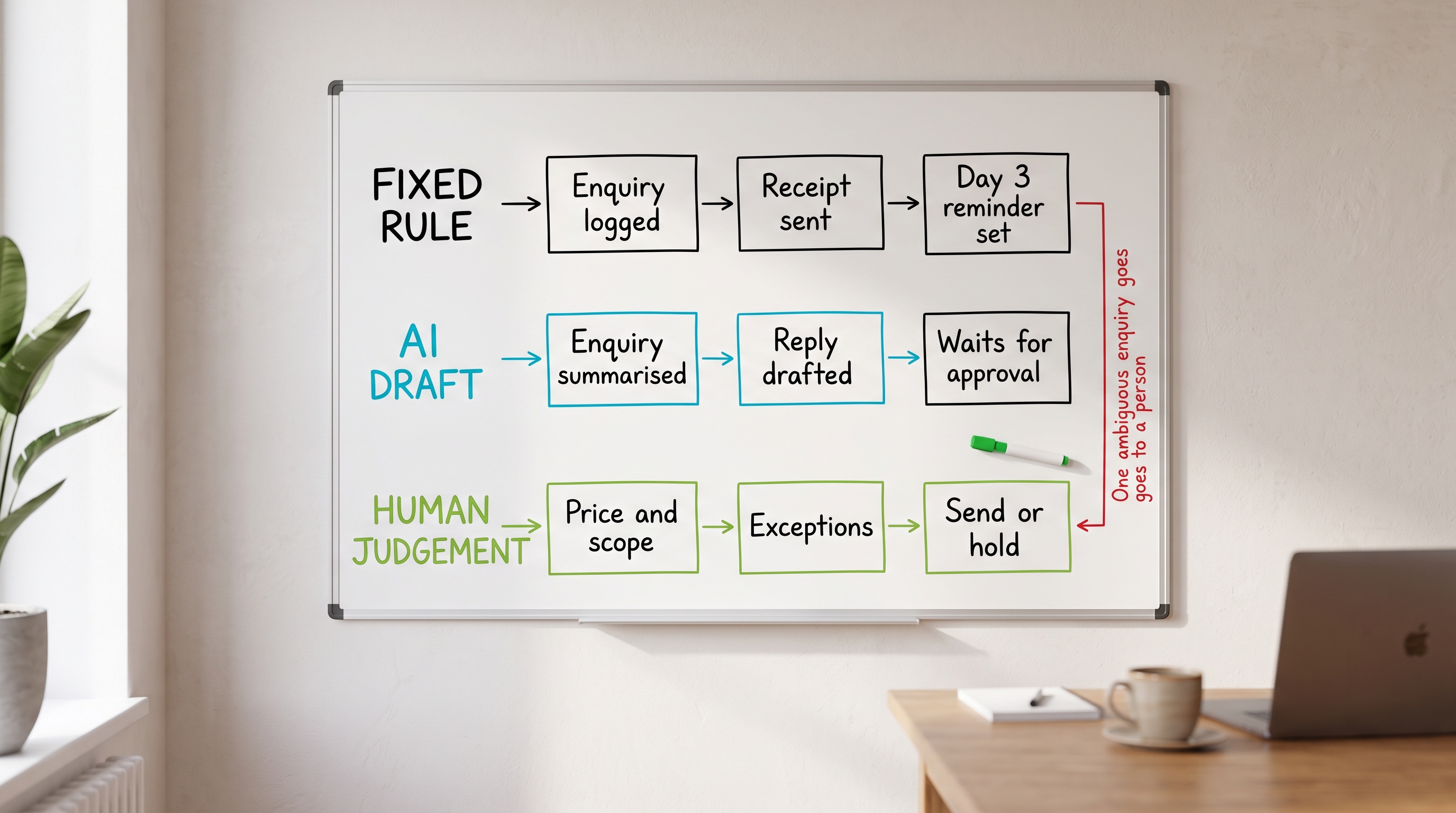
The top lane is the fixed rules. The enquiry is logged, the receipt goes out and the day-three reminder is set. Nothing in that lane needs reading, because nothing in it changes.
The middle lane is the AI-assisted work. The enquiry gets summarised, a reply gets drafted from your template, then it waits. Waiting is the point. The draft sits in a queue until you look at it.
The bottom lane is yours. Price, scope, exceptions and the decision to send or hold. The note down the side of the board is the rule that protects the whole thing: one ambiguous enquiry goes to a person.
Drawn out like this, you can see at a glance which steps can run unattended and which cannot. That is the difference between a process you trust and a process you keep checking.
Build the enquiry-to-follow-up plan
Here is the process a small business feels first: an enquiry arrives, gets a slow reply and never gets a second one. Six steps fix it, and only two of them involve AI.
The order matters more than the tools. Capture comes before acknowledgement, acknowledgement before drafting, drafting before any decision about price. Get that sequence right and the software has somewhere obvious to sit.
Read the six steps below as one loop, not six separate jobs. Two of them run without you, three of them run on fixed rules and one of them is the moment you approve what goes out in your name.

- Capture the enquiry onceOne form, one place. The fields match the inputs on your map, so nothing has to be retyped later.Fixed rule
- Acknowledge within minutesA short template confirming what was received and when a reply will come. No promises about price or availability.Fixed rule
- Summarise what was askedThree lines: what they want, when they want it, what is missing. This is the summary you read, not the customer.AI-assisted draft
- Draft the reply from your templateThe draft fills in the specifics and asks the one question needed to move forward. It waits in a queue for approval.AI-assisted draft
- Approve, adjust or route to yourselfYou read the draft, change what you want, then send. Anything unclear goes to the exception route instead.Human judgement
- Follow up on day three and day sevenTwo reminders, each carrying one useful thing rather than a nudge. The sequence stops the moment they reply.Fixed rule, with an approved draft
A two-person garden design studio receives enquiries through one form. The trigger is a form submission. The inputs are name, email, postcode, type of work, rough budget range and timescale.
Enquiry A arrives at 21:40 on a Sunday: a rear garden redesign, budget range given, wanted for spring. The fixed rule logs it and sends the acknowledgement. The AI step summarises it in three lines and drafts a reply from the studio's approved template, adding the one open question about site access. On Monday morning the owner reads the draft, changes one sentence and sends it.
Enquiry B arrives the same evening: a short message asking whether the studio can help with a boundary dispute and a wall that may need removing. The wording is ambiguous, the request touches a legal matter and the scope is unclear. The exception rule catches it, sends nothing, and puts it in the owner's queue flagged for a person, with the original message attached.
That is the design working as intended. Enquiry A saves the studio its usual twenty minutes of typing. Enquiry B reaches a human being, which is the only sensible destination for it. This example is written to show the shape of the process, not to report a result.
Write the exceptions and the privacy checks first
An exception is a designed outcome. Decide in advance what the process refuses to handle, and the routine steps become much easier to trust.
| Exception | How it is spotted | What the process does | Who handles it |
|---|---|---|---|
| Ambiguous request | Required inputs missing, or two different jobs described in one message | Sends nothing, flags the case, attaches the original message | Owner, same working day |
| Complaint or dissatisfaction | Keyword list, or a reply to an existing job reference | Pauses every scheduled follow-up for that contact | Owner, before any reply goes out |
| Legal, financial or medical wording | Keyword list agreed in advance | Stops the draft, marks it for manual handling | Owner, with advice taken if needed |
| Price or scope question | Budget field empty, or a discount request in the message | Acknowledges receipt only, no figures quoted | Owner, using the current price list |
| Special category or child-related data | Field checks and keyword list | Blocks the AI step entirely, keeps the record in the primary system | Owner, manual handling only |
| Tool failure or empty output | No draft produced within the set window | Falls back to the plain acknowledgement and alerts you | Owner, on the weekly check |
The privacy prompt to answer before launch
Personal data in an automated process needs the same care as personal data anywhere else. UK data protection law is changing, and the Information Commissioner's Office published a business briefing in May 2026 on meeting the new data law, listed in the sources below. Read the current version before you launch, then answer these six questions in writing and keep the answers with your process map.
Copy this privacy prompt into your notes
For this process, write down: 1. Exactly which personal data fields enter the AI tool. 2. Why each field is needed for the step to work. 3. Where the data is stored, in which country, and for how long. 4. Whether the provider uses submitted data to train its models, and how that is turned off. 5. Which fields are removed or replaced before the AI step runs. 6. What a customer is told about automated handling, and how they reach a person instead.
Then remove any field that fails question 2, and set a review date.
Two habits keep this manageable. Send the AI step the minimum it needs, and keep the master record in your own system rather than inside a chat window.
Not sure which job to hand over first?
Choosing the wrong first process is the quickest way to lose faith in automation. This short diagnostic ranks the jobs in your week by how well they suit an AI-assisted step.
- Answer a few questions about how your week actually runs.
- Get a ranked view of the jobs worth automating and the ones to leave alone.
- Use the result as the shortlist for the process map above.
Enter your email address and your result from Which Jobs Should You Give to AI First will be sent to you, along with the follow-up notes.

Test it before it touches a customer
Three stages, in order. Skipping the first two is how an automated process embarrasses a business in public.
- Dry run on old cases. Take ten past enquiries and run them through with sending switched off. Read every draft. Count how many you would have sent unchanged, how many needed edits and how many should have been exceptions.
- Supervised live batch. Switch it on for real enquiries with approval required on every message. Keep this stage until the drafts stop surprising you.
- Release the safe steps only. Let the fixed rules run unattended. Keep approval on anything carrying a promise, a price or a personal detail.
Write the pass mark before you start. A useful one: at least eight of ten drafts usable with light edits, no exception missed, no personal data in a place you cannot explain.
Measure the return and monitor it
An automated process should either give you time back or make the response faster. Put numbers to your own process, using your own figures.
Automation ROI calculator
Enter your own numbers. Nothing is stored or sent anywhere, and the figures below are your inputs, not a claim about results.
Based on 4.33 weeks a month. Change any field to update the figures.
Track three things beside the money: minutes per case, time to first reply and the number of exceptions each week. Rising exceptions usually mean the process needs a new rule rather than more automation.
Monthly monitoring checklist
That last line matters. A process you are willing to switch off is a process you are in charge of.
Keep the written process visible
An automated process only stays under control while somebody can see what it is allowed to do. The written version is that control.

Keep the map, the exception table, the privacy answers and the date of the last check together in one place, and keep that place somewhere you pass regularly. Automation drifts quietly. A new message gets added, a rule gets loosened, a field gets sent to a tool nobody reviewed, and none of it feels like a decision at the time.
A visible process makes each of those a deliberate change. Anything not on the page is not part of the process, so adding a step means updating the page first.
It also gives the monthly review a fixed home rather than a good intention. Same page, same checks, new date. When the second process is built, the page becomes the template, which is how business process automation using AI compounds instead of sprawling.
Two prompts to apply this to your own business
Everything above is a method. These two prompts turn it into a working session. The first decides what gets automated. The second builds the plan for the one process you choose.
Both are written on the seven-part prompt structure: role, task, thinking structure, specifics, context, breakdown by component, and examples with notes. Paste one into your AI tool, fill in the square brackets and answer the questions it asks before accepting the output.
Prompt one: decide what gets automated and what does not
Deciding prompt
1. Role. Act as an operations adviser to a UK small business. You are cautious, plain-speaking and commercially minded. You have no interest in adding software for its own sake.
2. Task. From the list of repeating jobs I give you, choose the single job that should be automated first, then classify every step in it as a fixed automation rule, an AI-assisted draft or human judgement. Say clearly which jobs should be left alone for now and why.
3. Thinking structure. Work in this order and show your working at each stage. First, restate each job in one line as a trigger, an action and a finishing point. Second, score each job out of nine on these signals: happens weekly, same steps each time, obvious trigger, obvious finish, information already in one place, a day of delay costs money or goodwill, the current steps could be written down in ten minutes, no pricing or legal decision inside the routine steps, the result can be seen and corrected before the customer sees it. Third, rank the jobs by score. Fourth, take the top job only and split it into steps. Fifth, put each step in one of the three columns. Sixth, name the risk that would make you refuse to automate a step at all.
4. Specifics. Never place pricing, promises, dates, legal, financial or medical wording, or anything touching special category or child-related data into an AI-assisted step. Fixed rules must be identical every time with no wording decisions. Anything requiring interpretation of what a customer meant belongs to human judgement. Score honestly. A low score is a useful answer.
5. Context. My business: [what it sells, to whom]. Team: [number of people and who does the admin]. Volumes: [enquiries, orders or jobs per week]. Tools already paid for: [list]. Time available to set this up: [hours]. The repeating jobs in my week: [list six to ten, one line each]. What annoys me most: [one line].
6. Breakdown by component. Return, in this order: a) a scored table of every job with the total out of nine and a one-line reason, b) the recommended first job and why it beat the others, c) a step-by-step table of that job with a column stating fixed rule, AI-assisted draft or human judgement, d) a list of steps you would refuse to automate, with the reason, e) the three jobs to leave alone for now and what would have to change first.
7. Examples and notes. British English. No invented figures, no claims about time saved, no product recommendations unless I ask. If a job description is too vague to score, ask me about it rather than guessing, and ask no more than five questions in total before producing the tables.
Prompt two: build the plan for one process
Build prompt
1. Role. Act as a process designer who builds simple, testable automations for one-person and two-person businesses. You write specifications a non-technical owner can hand to any tool.
2. Task. Produce a complete one-page plan for automating the single process I name, so that fixed rules handle the routine steps, an AI tool drafts the language and I approve anything carrying a promise. The plan must be buildable without further explanation and safe to switch off.
3. Thinking structure. Work in this order. First, write the process map: trigger, inputs, outputs, owner, exception route, finish line. Second, list the steps in sequence and label each one fixed rule, AI-assisted draft or human judgement. Third, write the exception list before anything else about the wording. Fourth, write the privacy answers. Fifth, write the test plan. Sixth, write the measures. Seventh, review your own plan and name the two places it is most likely to fail.
4. Specifics. Every AI-assisted step must produce a draft that waits for approval, never a message sent unread. Exceptions must cover an ambiguous request, a complaint, legal or financial wording, a price or scope question, special category or child-related data, and a tool failure or empty output. Each exception states how it is spotted, what the process does, and who picks it up. One ambiguous case must always reach a person with the original message attached and nothing sent. The privacy answers must state which personal data fields enter the tool, why each is needed, where it is stored and for how long, whether the provider trains on submitted data and how that is turned off, which fields are stripped before the AI step, and what a customer is told about automated handling and how they reach a person instead. The test plan must have three stages: a dry run on ten past cases with sending switched off, a supervised live batch with approval on every message, then release of the fixed rules only. State a pass mark before the test.
5. Context. The process: [name it, for example new enquiry to follow-up, quote preparation, invoice chasing, client onboarding]. It starts when: [trigger]. It finishes when: [finish line]. Information I already collect: [fields]. Where that information lives: [tool or place]. Volume: [cases per week]. Current time per case: [minutes]. Value of an hour of my time: [pounds]. Tools I can use: [list]. My tone of voice rules: [two or three lines]. What is never promised in writing without me: [list].
6. Breakdown by component. Return, in this order and clearly labelled: a) the process map on one page, b) the numbered step list with its three-way labels, c) the exception table, d) the six privacy answers, e) the drafting instruction I will give the AI tool at the AI-assisted steps, written as a reusable prompt, f) the approval checklist I run before sending, g) the three-stage test plan with the pass mark, h) the measures to track monthly and the monitoring checklist, i) the two most likely failure points and the rule that prevents each.
7. Examples and notes. British English, plain words, no jargon left unexplained. Do not invent figures, results, prices, legal advice or claims about what the tools can do. If a required detail is missing, ask for it rather than assuming. Where a step could be done by a fixed rule or by AI, choose the fixed rule and say why. Keep the whole plan short enough to print on one page.
Run the first prompt once a quarter and the second every time a new process earns its place. The answers are yours to accept or reject, which is the point of keeping the judgement column where it is.
Fit the automated process into the whole business
One tidy process helps. Fourteen working together is what makes a business steady enough to grow without more hours going in.
The 14 Fs of Evergreen Business Success sets out the fourteen areas an evergreen business runs on, with the prompts and skills files to work through each one. It shows where an automated process sits, what it feeds and what has to be in place around it.

The product page opens in a new tab and shows what is included, the current price and the one-time purchase route. Nothing is charged from this page.
Working on the whole system rather than one process?
The NOAM EcoSystem™ is the complete twenty-product system, built to be worked through in order.
SEE THE FULL NOAM ECOSYSTEM™
That page explains the twenty products, the order they are used in and the access routes.
Frequently asked questions
What is business process automation using AI?
It is a defined process where fixed software rules handle the routine steps and an AI tool assists with the language work, such as summarising an enquiry or drafting a reply. A person keeps the judgement, the exceptions and the final approval.
Which process should a small business automate first?
Choose one that repeats weekly, follows the same steps each time, has a clear trigger and a clear finish, and creates a delay when it is late. Score the candidates before building anything.
What is the difference between a fixed rule and an AI-assisted step?
A fixed rule always does the same thing, so it can be tested and trusted. An AI-assisted step produces different wording each time, so it needs a review point. Keep pricing, promises and personal circumstances out of the AI-assisted step.
How do exceptions work in an automated process?
Write the exception list before launch. Anything ambiguous, sensitive, legal, financial or a complaint routes to a person with the original message attached. An exception is a designed outcome, not a failure.
What privacy checks does an AI-assisted process need?
Record what personal data enters the tool, why it is needed, where it is stored, how long it is kept and whether the provider uses it for training. Keep special category data out. Check current ICO guidance before you launch.
How do you test an automated process safely?
Run it on ten past enquiries with nothing sent, then a small live batch with every message approved before sending, then release only the steps that passed both stages.
How do you measure the return on an automated process?
Compare minutes per case before and after, multiply the saved time by the value of an hour, then subtract the tool cost and the time spent on reviews and fixes. Track response time and the number of exceptions alongside the money.
Does automation replace the person in a small business?
It removes the repeated typing and chasing. The judgement, the relationship and the decision about what to promise stay with the owner, which is where a small business earns its reputation.
Sources and further reading
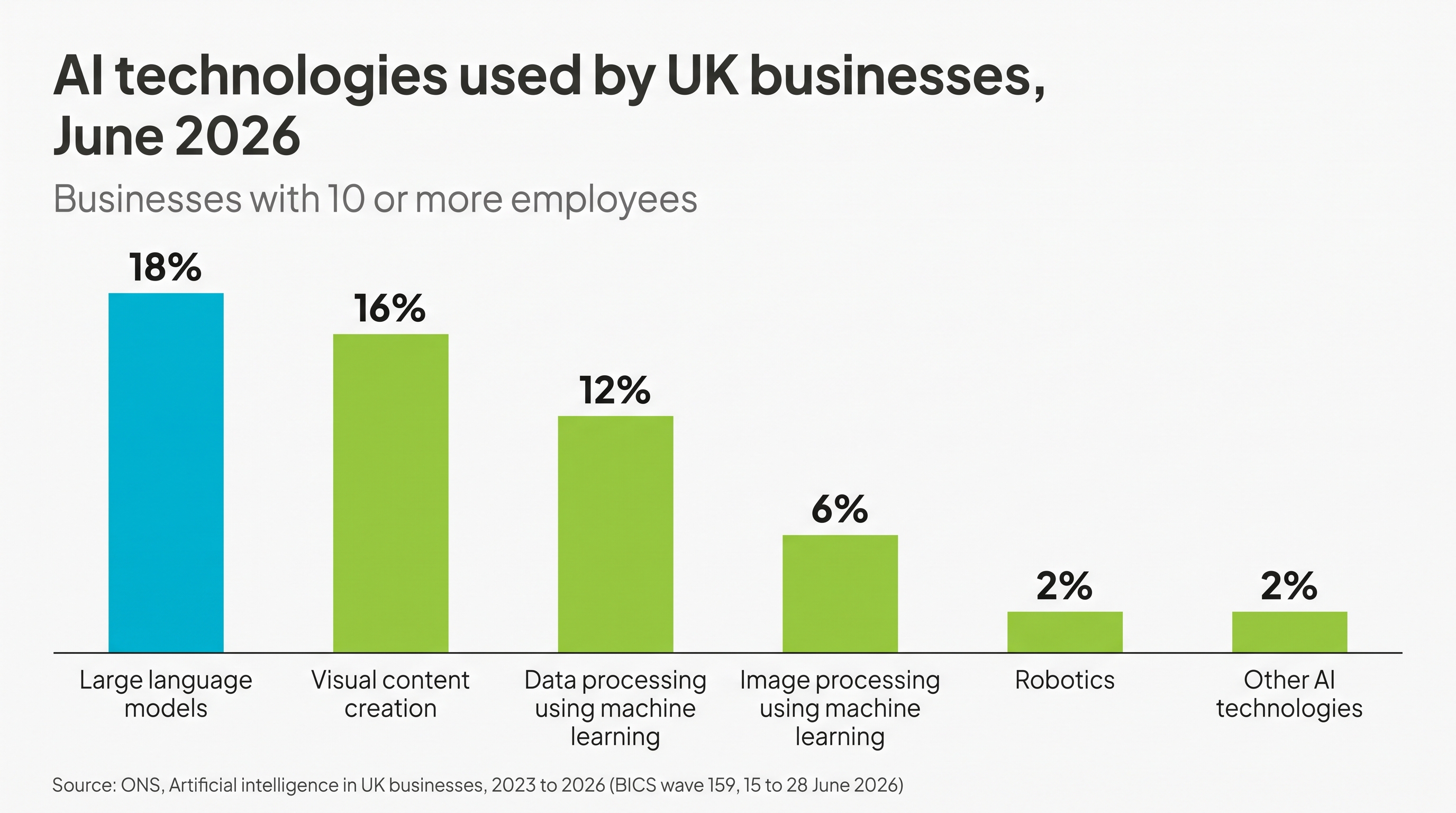
- Office for National Statistics, artificial intelligence in UK businesses, 2023 to 2026, published 20 July 2026. Linked beside the chart above. Last checked 1 September 2026.
- Information Commissioner's Office, one month to go: what businesses need to know to meet new data law, May 2026. Available at ico.org.uk in the news and blogs section. Last checked 1 September 2026.
- PassivAi, The 14 Fs of Evergreen Business Success. Contents and current price are shown on the linked product page.
- PassivAi, NOAM EcoSystem™, the complete twenty-product system. Contents, order of use and access routes are shown on the linked page.
Business process automation using AI is a planning job before it is a software job. The plan is what makes it safe.
Choose one process. Map the trigger, inputs and outputs. Label every step as a fixed rule, an AI-assisted draft or human judgement. Write the exceptions and the privacy answers. Test on old cases, then on a small live batch. Measure the minutes and watch the exceptions.
Then do it once more with the next process, using the same page.

Kerry Greener
Founder of PassivAi. Thirty years of hands-on experience building businesses, websites and online marketing campaigns for hundreds of different companies.
More about PassivAi.
Primary route
The 14 Fs
The fourteen areas an evergreen business runs on, with the prompts and skills files to work through each one in order.
SEE WHAT THE 14 Fs INCLUDES
Free tool
Which Jobs Should You Give to AI First?
A short diagnostic that ranks the jobs in your week by how well they suit an AI-assisted step.
 Optional diagnostic
Online Business Compass
If the bigger question is which area needs attention first, the Compass points to one of Niche, Offer, Audience or Market. It is one diagnostic inside the NOAM EcoSystem™, not the whole system.
TAKE THE COMPASS QUIZ